I was/am thinkpad user also.
I have migrated to desktops.
They are cheap enough to have one at the office and one at home.
Sure the above wont work for everybody, but if you are like me, you unpacked the laptop at home and at work each day at exactly the same space, where all the cables and extra monitors were.
I used to use laptop in coffee shops and outdoors, but nowadays between phone, and tablets (wel phone and kindle in my case) I almost never feel the need.
Buy silent box, mobo for overclocking and underclock it for extra silence, and throw the box under the table.
Still have my laptop, but its mostly just "backup" and in case I travel somewhere, but honestly I don't care about it as much
With the quality of networks these days it may pay off to just have a single beefy desktop at work or home and a very simple desktop in the other location that you just use to remote in to the first. Keeps the environment consistent over time and even allows leaving long running computations running and picking them up later. Two remote stations and a headless server in a rack somewhere may even be better. No worries about noise and cooling.
i just keep my personal dot files in git, not system config.
Systems are slightly different, at work i have two 27 inch monitors and at home i have one 30 inch, and I do play some paradox games on home computer on ocasion
My main reason to go for a laptop was that I wanted to continue coding where I left off and not have to worry about differing settings and system configuration.
I do all my development in VSCode, and symlink my settings to a git repo. VSCode really let's you customize a lot of stuff, and if you lean into it as your development environment, you get awesome cross platform support.
That same git repo has scripts that apply some of my system configurations, and a readme to walk me through the GUI stuff I have to do.
My first few setups were hard. I had to debug some weird issues on my Linux install. (Not sleeping properly, remapping some keyboard keys).
But now I've got it cased. I setup 3 machines (2 Linux, 1 windows) over the past couple days and all are essentially equal development experience now. Was super fast to setup l. If your going the Linux route, make a repo where you record all the tweaks your making so you can redo them if you need to on a new machine.
It's shitty the first time, but now I know I can buy any new machine and have it ready to rip in mere minutes. With my custom keyboard layout (home, end, pageup, pagedown, alt, cntrl, alt+tab), my custom VSCode hotkeys, my ssh key identity management, my terminal font and themes, my system hotkeys (moving windows around and switching workspaces). Now that I've got all this setup, it feels great. Feels very fluid on all 3 machines.
3 machines Syncthing setup between desktop, laptop and a cloud instance in case laptop wasn't on to sync and the desktop is off for some reason.
It takes about 15s from connecting the laptop to the internet to having the files synced to it. Just need to remember to save files in emacs.
Setting up Syncthing in the cloud was a challenge, had to tunnel the web-ui with ssh port forwarding.
I too went desktop route. Built what I want - including lots of ECC memory. I too have a laptop for backup and travel (and a Chromebook used as RDP client).
Sync isn't an issue. All work is on VMs, and they get backed up every day to my Synology.
My backup laptop is a 6 year old Thinkpad, which hasn't been out of it's bag in over a year.
The downside with this is extra effort to keep them in sync. Depending on what you do, syncing can be easy (or even trivial if you do everything remote anyway) or more annoying.
>>>*laptop at home and at work each day at exactly __the same space__, where all the cables and extra monitors were.*
Nope. Actually, just like with my phone chargers, I like to have a laptop charger in all the spaces I like to compute.. I like to have a charger in my bedroom, my living room and in the garage.
I used to have this for all my machines - though I now have a new HP Omen (bad ass machine) - but I only have one charger for it currently.
I havent touched my ipad in a really long time.
But here is a tip - this super light and super cheep USB screen is AMAZING to have with a laptop:
(This thing was $69 when I bought it - but its now $99 but still - a USB only monitor is fantastic.
What I do, is I make it the top monitor - and I have this TV Tray stand that is at the perfect level for me to have my laptop on my lap, a tray or a TV tray, and then I have the AOC monitor on this stand and I just move up to click on that mon...
And this is dope because during this pandemic, I am trying to take every free training I can get my digital hands around.
So I have the training vid on the top screen and then I can use whatever program(s) I need on the laptop...
Blender courses are a good example of how this works great. The point is to have the two screens stacked vertically so that you only move your eyes up and down and dont have to turn your neck...
I'm on the same boat as you: my ideal laptop would be an x220/x230 on the outside with a 1440p display and a modern CPU on the inside.
I can't understand why Thinkpads are moving away from this absolutely perfect design in the name of... slickness?
Why are laptops with a minimal (or non-existing) touchpad so difficult to find? Once you start using the trackpoint your wrists feel incredibly relaxed at all times.
Why do so few vendors offer RJ45 ports? When in the lab, I find my self needing one almost daily.
Why this trend of including keyboards with shorter and shorter travel distance?
There was a campaign to bring attention to all these details a few years ago which (surprisingly!) resulted in Lenovo releasing the "Thinkpad 25 anniversary edition" [1] which ticked most (but not all) of my boxes and which is unfortunately no longer available.
Do people really prefer the new design trends? Am I out of touch with reality?
The X220 is nowhere near an "absolutely perfect" design, it's way too wide. I still use one as my daily driver, but come on. The screen bezels are huge, the keyboard stretched to fill its wide footprint, and the power plug juts out the back where it gets stressed against the floor in any cross-legged, or other tilted back usage setting.
The X61s was far closer to an absolutely perfect design, it just needed less plastic in the chassis. Things started going downhill with the X201s in the transition to wide aspect ratio displays, and X220/X230 arrived at full retard on that trajectory.
You are completely right. The X61s is a better design (I happen to own one too!), I completely forgot about it as, due to its much slower CPU, I must have put it away somewhere in the attic many years ago :)
I honestly love overhearing you discuss your perfect computers, because it doesn't seem impossible that you might get your wish! One really interesting possibility is to recycle the X61s chassis and use modern PCBs, chips, and peripherals to get you what you want. Another possibility is the creation of a PC ecosystem similar to the "Red Camera System" where yes, your m2 module costs $5k instead of $500, but it it comes in a machined aluminum module that fits perfectly with the rest of your tricked out customized laptop.
Likelihood of people actually using products they buy is overestimated, I think.
Lots of games on Steam has achievements for extremely simple tasks, such as launching the game for the first time or playing it for five minutes, and popularity of those is typically around 82.5% and 75% respectively among audiences for most popular titles.
IOW, 17.5% of PC game enthusiasts pay for a game and immediately put it on a shelf and don’t even double click on the icon. 25% reaches past the loading screen. Of all purchasers, maybe 10% reaches the final boss or end of the storyline. Potentially less.
A person who has issues with a mainstream laptop for its lack of an Ethernet port few years into ownership, who knows how many of those exist in the whole world?
The X1 nano is the same width and height as a X220 but half the thickness and significantly lighter. The X13 is very close to that too on the lower end. What would you change in those?
Having been a user of the old X lines throughout the years the current X/T and X1 lines seem like a definite improvement to me. And I also use the trackpoint exclusively.
I own both the x230 and the x395 (which is, externally, almost the same as the x13) and I can definitely feel a difference when typing on the much more comfortable x230.
It's mainly due to two factors: 1) thanks to having a very small touchpad, the keyboard is closer to the edge and I feel much less strain on the lower part of the arm, near my wrists, which becomes more apparent after long coding sessions; and 2) the key travel is much longer and typing feels "better" (I make far less mistakes).
Also, because the x395 is almost half the thickness, they could not fit a bigger battery (which is definitely my main complaint on these newer machines).
Don't get me wrong, the "X" series is great and I will probably get the latest version when I need a replacement *but* I'm sad they make these sacrifices in the name of "design".
Have been using an X1 Nano for a few weeks now and so far it's been quite nice. Light as a feather, decent keyboard/trackpoint/trackpad, reasonably battery life, and the 16:10 screen ratio works so much better on this size than 16:9.
Feels quite well built despite the low weight, too. It doesn't sacrifice on solidness to achieve its weight.
The X1 Nano seems like a great buy. I think I will hold out for 9th gen X1 Carbons to drop in price, however, because I want to bump up the RAM to 32gb and keep the laptop for a long time, lessen the chance of my workloads outgrowing the machine. Or I will wait for the T series to get the 11th gen Intel chips and 16:10 screen
Plus the extra battery life in the Carbon. But the X1 Nano beats my 2020 intel macbook air in battery life from the benchmarks I've seen, which could be longer I have not found lacking
Yeah I made the same consideration. Carbon G9 has some distinct advantages but I needed the laptop sooner than later (who knows how long it'll take the G9 to come down to reasonable prices in the current environment) so I went ahead and bought the Nano.
I think there is definitely space to at least offer some SKUs with all that, albeit at a high markup (kinda like the Mac Pro).
However I think that yes, most people (including me) prefer the new to the old. Eg.: I dislike full keyboards because it shifts my hands to a side and moves the mouse further away. I tried track points but I find touchpads superior. I don’t need an RJ45 because even if I wanted to use it, I’d much rather have it on a USB-C dongle with pass through power, so I only have one cable to disconnect when moving around. And call me crazy, even though I use a mechanical external keyboard most of the time, I actually like typing on the butterfly keyboard more than on other laptop keyboards I have and had.
I'm guessing that because laptops are portable machines, almost nobody ever uses the network port and if you need one, you can use an adapter with the USB port.
They come close in number of ports and battery life *but* they still have an excessively big touchpad, don't have a 13 inch version and start at 1.7 kilos (which makes them less than ideal for carrying around).
But I agree they are the very nice machines and we keep a bunch of them in the lab.
It's worse than you think: They are somewhat hamstrung in their hardware decisions by the current offerings from those Apple/Ultrabook chasing OEMs, but in this case they jumped the shark entirely and removed the 2.5" drive caddy.
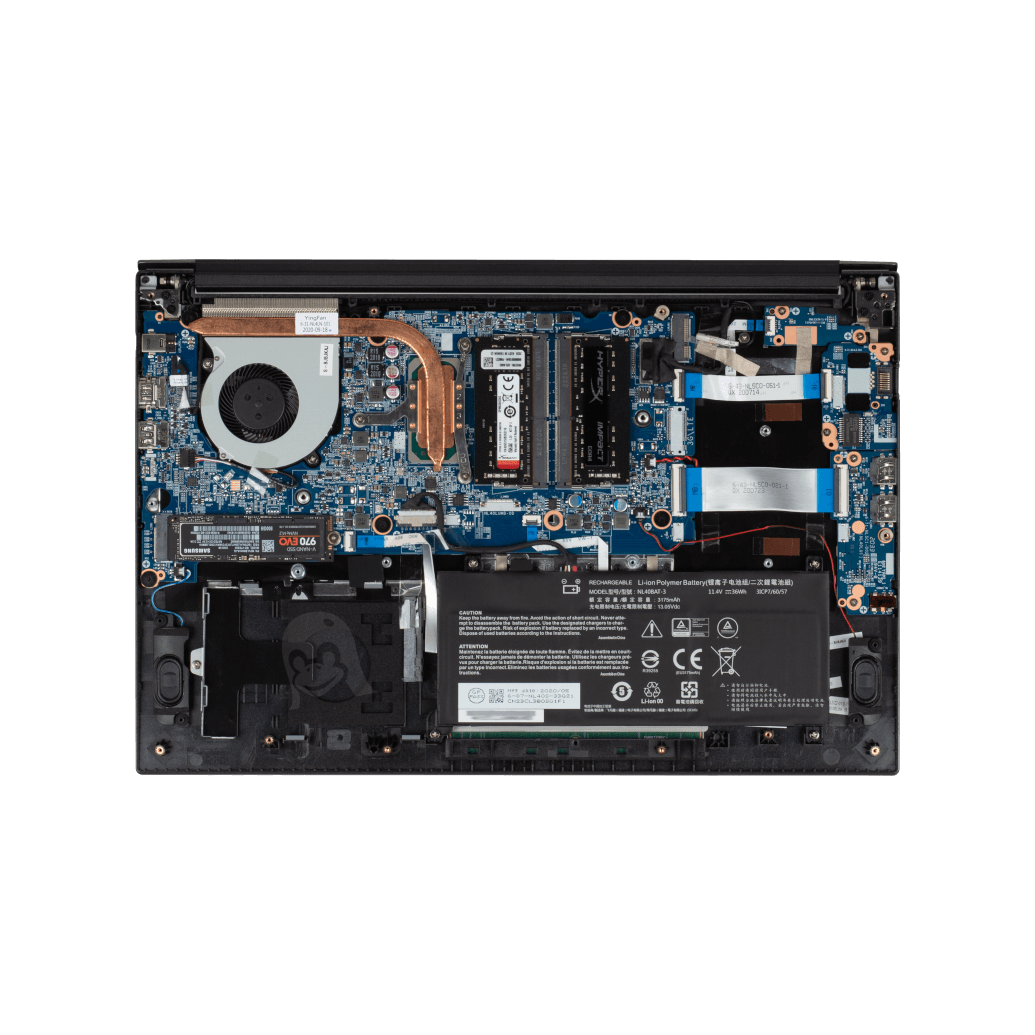
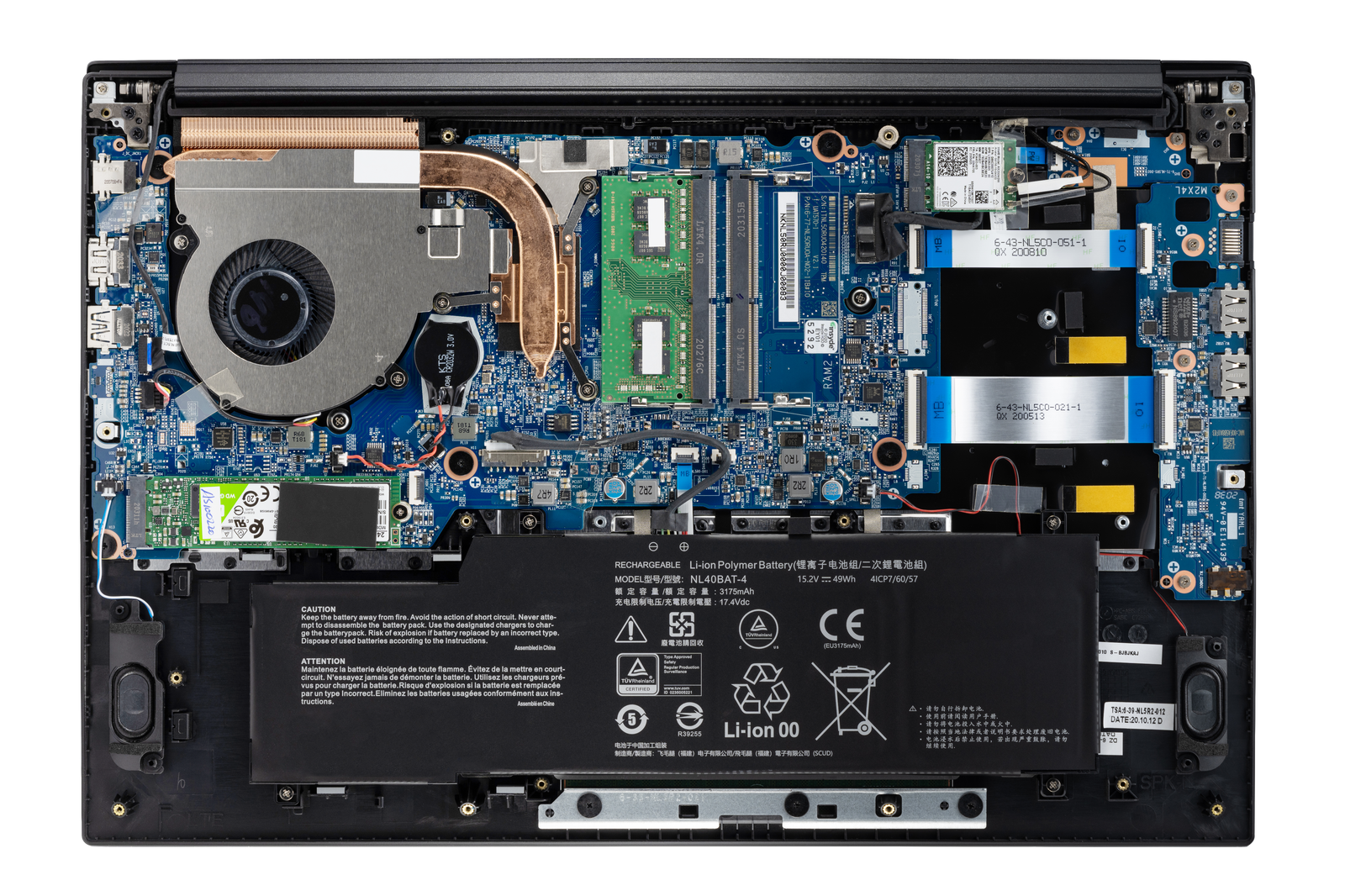
The nearly identical Clevo NL51RU/NL50RU [1] has a 2.5" drive caddy but a 36 Wh battery. Take a look at the internal photo of the System76 unit at [2]. It's the same laptop. Heck, they didn't even bother removing the boss and brass insert for the 2.5" drive retaining screw by the left speaker.
System76 is not an OEM, they whitelabel and have tweaks made to Clevo/Sager laptops. I think they do a great service to the Linux community with PopOS and driver development/compatibility to make those into machines where Linux "just works" out of the box, don't get me wrong.
This obsession with thin-and-light goes completely counter to the whole point of "Our laptops’ guts are fully accessible!". They say they've got a tactile keyboard, to fit in 20mm thin right on top of the heat sink for the high-power Ryzen processor and discrete graphics I think I'm pretty safe in assuming it's a pathetic <1mm key-travel scissor unit.
1" thick or more is not too much. You could fit in all the ports, as well as an 80 Wh battery, and cooling to run at boost frequencies for more than 20ms. You don't have to match the dimensions of a Macbook Air and be able to slice tomatoes with the wrist rest.
I think it depends a lot on an individual's needs. Like in my case, a recent laptop purchasing decision revolved around qualities that make a laptop particularly good at being a laptop — that is, high portability, low/no noise, little/no heat. Power and ports were a cherry on top because I already have another machine that fills those needs.
In that situation, 1" isn't necessarily too thick, but it is negatively impacting its functionality as a laptop, if only because added thickness implies added weight (especially for sizes larger than 13").
With that said, ultraportables shouldn't exist at the cost of models more oriented toward power and flexibility… they should be an option alongside more traditional laptops.
I agree with your general sentiment. (He says typing on his Dell XPS 13...) But it also seems to me that ditching a drive bay to get a bigger battery is the definition of a design decision and not in any way jumping the shark.
Thanks for sharing this, it looks outright incredible. I love my x201, but it's starting to feel a little long in the tooth these days... I may end up getting one of these. What's the battery life like?
I can typically get 4-6 hours with an OEM x201 battery? I really don't try to max out the battery though. It really depends on your usecase as well, as I don't do anything too harsh with it.
I have an x200 as well, so if I was really worried I could just carry a spare battery.
I've been looking around for a good linux laptop dev machine and am starting to resolve around the idea of having multiple desktops. It's cheaper with better support for replacing parts as well as linux.
The laptop market churns way too much for my liking and I feel like the second I move away from my macbook pro (work) I'm going to be disappointed with the quality.
When it comes to development, my goal is to be able to ssh into my linux box and use that for most development (tmux + vim). That plus ZeroTier and I now have access to my dev machine from wherever.
Even on large codebases written in Typescript, vim + plugins are "good enough."
macbook pro + live inside an ssh terminal seems to be working well enough for me.
The closest I came was my XPS 15 9560. The build quality and hardware was excellent. i5 + GTX 1050 + 8GB RAM + 256 GB NVME + Thunderbolt. Linux support was phenomenal, especially on a rolling release. After about 18 months of owning it, I upgraded the memory to 16GB and storage to 1 TB without any problems. Unfortunately, I ran into a few issues trying to use it as a work and home machine.
1) Mixed DPI is insanely bad on Linux, and that issue is amplified if you have Nvidia hardware. At least as of last month, Wayland and XWayland are basically unusable with Nvidia. Since the laptop screen is 4k, but I was using a Thunderbolt dock plugged into 2x1080p monitors, I'd have to turn off display scaling on the laptop, and, because I was stuck on X11 because Nvidia, I'd have to restart the laptop for the scaling change to take effect.
2) There was no Thunderbolt dock support for unlocking full disk encryption, so if you wanted FDE, you either had to unplug the laptop from the dock, open it, type the password and plug it back in every time you turn the laptop on, or just not used a Thunderbolt dock. This wouldn't be a big deal except I was restarting the laptop frequently when changing pretty much any display parameter.
3) There was no clear best practice for managing switchable graphics. There are options like Bumblebee that I never really figured out if they were working properly - especially for games. Then, Nvidia supposedly added a "primus-run" feature to the driver, but again, it seemed to just not work. Eventually I settled on "prime-select" but that involves rebooting every time you switch.
4) Selecting the Nvidia graphics disabled on-board audio. I had to either use USB or Bluetooth. I never figured this out despite countless hours of messing around with alsamixer. My best guess is that it was trying to direct everything over the HDMI out even though that wasn't plugged in. The Intel drivers were loaded, just every time I selected the Nvidia chip, the audio devices would disappear.
In the end, I settled on picking up an Acer Aspire refurbished from eBay. It has an i5 10400, 12GB RAM, and a 512GB SSD. I put a 1050 Ti in it without any problems. The total system ran me $500. It's much nicer. So the moral of the story is for me, if you do go Linux laptop, avoid Nvidia like the plague.
>4) Selecting the Nvidia graphics disabled on-board audio. I had to either use USB or Bluetooth. I never figured this out despite countless hours of messing around with alsamixer. My best guess is that it was trying to direct everything over the HDMI out even though that wasn't plugged in. The Intel drivers were loaded, just every time I selected the Nvidia chip, the audio devices would disappear.
Try sudo alsactl restore
I have a Dell G5 with Nvidia RTX and my headphones do not work when I start it
Took me a few months of investigation, but that alsactl command fixes it in 90% of situations
Unfortunately, I need CUDA for work. However, with a desktop and static resolution (not changing from laptop 4k to dock 1080p all the time) I can comfortably use X11, and without power management issues (no battery on desktop) I don't have to switch between Nvidia and integrated graphics.
I had the same problem. As lenovo seems set on making thinkpads more like macbooks I just embraced it and got the m1 macbook air instead of another thinkpad. It’s amazing, as long as I don’t need to repair it.
I would cry tears of joy to get a laptop with mouse buttons. Trackpad gestures are a gimmick and so much harder to user than buttons. Apple did it to be "bold" and everyone copied them.
Apple has only ever shipped single-button mice with their computers, so turning the whole trackpad into that button on their laptops was a pretty simple evolution. Gestures came much later.
This is one of the reasons I still enjoy using my old XPS. The buttons are great: nice deep solid clicks. Even doing stuff like dragging windows around is so much better than on a touchpad-only design. (I've used Macbooks with the old "hinge" style touchpad, and they're even worse than using a double-tap-and-drag gesture, just because of the force needed to keep the button pressed.)
Given the number of people these days who don't even own a desktop, I don't understand why mouse buttons aren't the standard. With the XPS I can even play casual games while sitting on the couch. No need to move to a desk and dig a corded mouse of the drawer!
I moved from Macbook to a ThinkPad (trackpoint+trackpad+mouse buttons+trackpad buttons).
I never used gestures. But I seriously miss inertia scrolling. You never realize how much a pain in the ass it is scrolling web pages until you don't have it. Firefox has it, but you have to turn on an environment variable to get it and it feels a bit weird to me. Chrome does not have it all on Linux. And the way they are implementing it means that every app has to reimplement inertia scrolling on its own. Sigh. At least you can hold down the middle mouse and use the trackpoint to swiftly scroll.
Maybe I'm mistaken, but this is just when you scroll, release your fingers, and it slows to a stop instead of stopping instantly, right? I have that out of the box here on Linux. Firefox + X + touchpad with the synaptics driver.
I had thought this was what "Use smooth scrolling" did it in the Firefox preferences.
Edit: I also just checked and I have this in my terminal (Konsole), text editor (KWrite), and PDF viewer (Okular) so this is at the very least not a Firefox only thing. It feels exactly the same in each application. I bet it's a feature of the touchpad driver.
And is there anything as enduring and resistant as the thinkpads?
I accidentally spilled a glass of water on my old thinkpad w, and all I had to do was to replace the keyboard (happened twice). It also helped that I could find spare part easily online. Would it be possible with lesser-know brands? It also fell several time on the ground but never broke anything.
I'm honestly very interested to know if there are laptops as durable as thinkpads.
The one thing that stops me from getting a Librem 14 is the utterly hateful decision to have a tiny right-shift key to the right of the up arrow. Like seriously wtf Purism?
Oddly enough, I almost never hit the right shift key. I touch type pretty fast, but the left pinky does a lot of work. I suppose it comes from CAD stuff and (let's be honest) WASD gaming where my left hand is on the keyboard and right hand is on the mouse.
But I totally agree: Input and output to the user (keyboard, trackpoint/mouse buttons/touchpad/screen) are of critical importance. I can be really effective on a decade-old Thinkpad (with the IPS display mod!) and woefully out-of-date processor, but if it takes too long to adjust to the keyboard I'll be frustrated every time I have to use it.


* trackpoint + buttons (can be without touchpad, disabled anyway) * full keyboard * strong durable * removable battery * 4k screen * ecc 64-128gb * rj45 * lots of ports * hardware switches to disable: networking, camera, mic,..
Thinkpad's are move farther away each year. I hope some company will fill the gap.