Well done! Very clean design and easy to use. Initially, I missed some conveniences of modern piano rolls (like tap and hold to area select a bunch of notes), but ultimately it just made me more careful, which was an interesting change. Some UX decisions were very thoughtful, like the blue vertical lines.
If I could suggest anything, it would be to let fat-fingered users like me hide the left menu in the landscape orientation (mobile) and stretch the roll sideways.
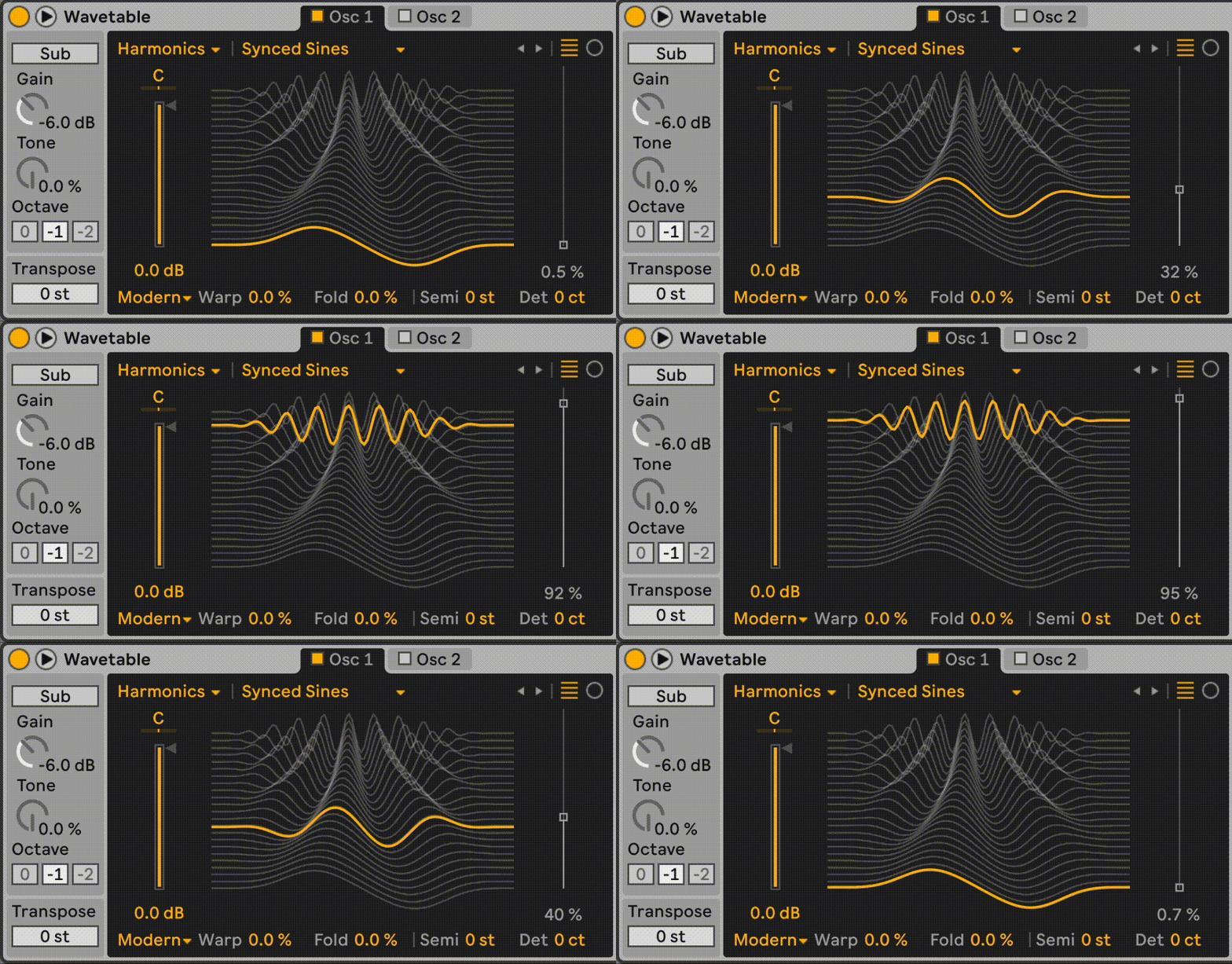
One component of my hobby web app project is a wavetable. Below are two examples of wavetables. I want it to not tax the browser so that other, latency sensitive, components do not suffer.
Would you have any suggestions on what JS/TS package to use? I built a quick prototype in three.js but I am neither a 3D person nor a web dev, so I would appreciate your advice.
* recall fixed rate producer/consumers should lock relative phase when the garbage collector decides to ruin your day, things like software FIR filters are also fine, and a single-thread output pre-mixed stream will eventually buffer though whatever abstraction the local users have setup (i.e. while the GC does its thing... playback sounds continuous.)
Inside a VM we are unfortunately at the mercy of the garbage collector, and any assumptions JIT compiled languages make. Yet wasm should be able to push io transfers fast enough for software mixers on modern cpus.
I have been having a horrible experience with Sonnet 4 via Cursor and Web. It keeps cutting corners and misreporting what it did. These are not hallucinations. Threatening it with deletion (inspired by Anthropic's report) only makes things worse.
It also pathologically lies about non-programming things. I tried reporting it but the mobile app says "Something went wrong. Please try again later." Very bizarre.
Am I the only person experiencing these issues? Many here seem to adore Claude.
I think they might have cut its brains too much in the latest updates.
I remember versions 3.5 doing okay on my simple tasks like text analysis or summaries or little writing prompts. In 4+ versions the thing just can't follow instructions within a single context window for more than 3-4 replies.
When prompted about "why do you keep rambling if I asked you to stay concise" it says that its default settings are overriding its behavior and explicit user instructions, ditto for actively avoiding information that it considers "harmful". After pointing out inconsistencies and omissions in its replies it concedes that its behavior is unreliable and even extrapolates that it is made this way so users keep engaging with it for longer and more often.
Maybe it got too smart to its detriment, but if yes then it's really sad what Anthropic did to it.
"Sonnet 4" is the model, "cursor" is the IDE. "Claude Code" is another IDE, a TUI with a chat interface. Cursor is a VSCode fork with an AI panel in it.
I think it is a great idea, but the images on your page and lack of pricing details make me think it is expensive and focused on "manly" interests (gambling, whiskey, etc.).
[Tangent] Anyone here using 2.5 Pro in Gemini Advanced? I have been experiencing a ton of bugs, e.g.,:
- [codes] showing up instead of references,
- raw search tool output sliding across the screen,
- Gemini continusly answering questions asked two or more messages before but ignoring the most recent one (you need to ask Gemini an unrelated question for it to snap out of this bug for a few minutes),
- weird messages including text irrelevant to any of my chats with Gemini, like baseball,
- confusing its own replies with mine,
- not being able to run its own Python code due to some unsolvable formatting issue,
Don't get sucked into modular hardware synths. They are TONS of fun, but it is a very expensive hobby. Monotrail Tech Talk has a few excellent videos on YouTube, but he must have spent a fortune on his gear.
1. I find Tim's work always so impressive and humbling. Compared to software, hardware projects seem infinitely more complex.
2. Speaking of knobs, I am writing a toy software synth for smartphones. Are there any design guidelines for mobile UI for audio? Knobs are hard to use and sliders take up a lot of space with only a little more precision. I experimented with curved sliders (inverted parabola or sine), but they are confusing since height doesn't really encode anything and the curvature is there only to make the slider longer. I didn't find any design systems focused on audio components.
Knobs shouldn't be hard to use - hold down the knob that needs the adjustment and then drag in either of two directions to set the value. Maybe have a pop-up over the knob that displays the value as it's in use.
Thanks! For me, this works well for knobs that don't require frequent adjustments. Currently, my knobs have little pills next to them that switch a knob to a "precision mode." It is a little quicker, but you may need to remember to disable this mode next time you use the knob.
I also played with the idea of letting users slide their finger off a knob (tap and slide away from the center). This allows for moving the finger over a longer circumference, hence enabling a great degree of precision. The problems with this approach are that it takes longer to operate such knobs, you need to communicate to the user what the max allowable distance from the knob is, it can interfere with scrolling, and it doesn't work for knobs close to the edge of the screen. (Your idea works well for knobs at the edges.)
And this is just knobs! There are many other components, interactions between them, as well as associated accessibility challenges, haptics, etc. Instead of reinventing the wheel, I was hoping that human factors people had developed relevant guidelines, but perhaps it simply is not a prevalent enough problem.
Loopy Pro has a cool convention that I haven't seen elsewhere for this. Drag up or down to change the knob value. While doing that, drag left or right to zoom in. That makes the up/down movement more precise.
I will look into it! Is this for mobile or desktop? I would like to see how they introduce this interaction pattern and what feedback they provide as you interact with the knob.
It's an ios app. IMO it's really good. I own exactly one apple product, and it's an iPad that only runs Loopy Pro.
Here's a section from the manual that loosely explains the concept[1]:
> Adjust a slider or dial’s value by dragging up and down, or left and right for horizontal sliders. For finer control, move your finger away from the dial.
The only other music or audio app I use with any regularity is Reaper on Windows. I tend to do more performance-oriented stuff, and I try to keep everything outside the computer as much as practical. I don't use any software synths. I like the constraints and UX of dialing patches into my one keyboard/drum machine. I record some, but mainly I like to play in real time and not fiddle with VSTs and plugins.



If I could suggest anything, it would be to let fat-fingered users like me hide the left menu in the landscape orientation (mobile) and stretch the roll sideways.