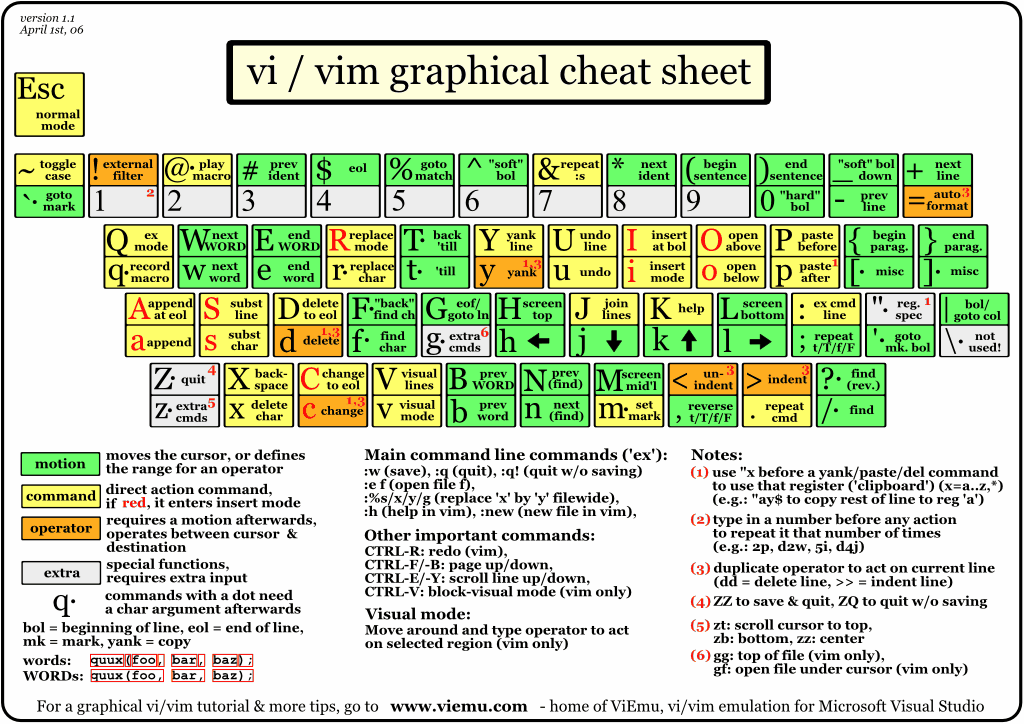
I always hate it when people say to use something like "Fh" to jump to the beginning of a section that starts with an 'h'. How much time will I waste thinking about whether or not there is or isn't another letter 'h' somewhere between the cursor and where I want to go? It's easy to construct examples like this after the fact, but it's not going to take me <1 sec to process the entire line for "are there any h's?"
Or am I in the minority here? Do people really think/code that way on a normal basis?
the f & t commands are more useful if they are composed with action commands. say, for example, I have used the method getNewObject, but then I realize that it's really supposed to be createObject. If my cursor is on the g, I can say ctOcreate<esc> (change the text between the cursor up to the character before the next O to read "create"). outside of vim, I have to move my cursor over to the O, backspace out the "getNew" and then type "create".
a nine character difference (or three if you have a delete-character command) doesn't sound like much, but it adds up & also breaks you out of your flow a little bit. I find myself doing refactorings other people wouldn't do, just because I know how to do them very quickly in vim, while others would be arrow-keying and back-spacing around forever.
Yeah, I actually do that. If I see it's an "h" that I need to go back to, I'll do the "Fh". Sometimes it takes me more than one jump to go back though (if any other "h" are in the way).
I find that having to concentrate on that actually refocuses me. Sometimes my mind needs a rest and I do it the lazy way, but by-and-large it is an excellent habit.