Once you have started to use a tiling window manager (Awesome WM in my case), you can't go back, it's just a huge boost of productivity for developers - especially when you come from OS X where dragging/resizing windows is a real pain.
shrug I've heard this argument many times, but this is clearly a different strokes situation.
I set my window layout up once at the start of a multi-hour working session. Most of the time, that's either 1) a large MacVim window and a terminal or 2) that plus a browser. It takes ~10 seconds to get it how I like it. After that, cmd+tab works just fine.
Even on my 27" display, I usually prefer to have a little overlap where all three windows rest in such a way as to permit the most relevant bits to be visible simultaneously, while allowing for overall larger space when an individual app is focused. Tiling window managers tend to distort windows to less than ideal proportions, as they strictly eliminate overlap. That said, I utilize splits (ie tiling) within vim to great extent.
Obviously it's personal, but the main issue I've always had with Alt-Tab is that as soon as you have more than 2 windows, getting to a specific application is now something you have to think about (or hit key, look, possibly hit key again). Since I'm often doing web development, I usually have a terminal open, an editor, and a web browser. Except for terminals, I pretty much always have everything full screen - the benefit is that Super-1 gets me to terminal(s), Super-2 gets me to my editor, and Super-3 gets me to the browser.
This is also true in Ubuntu's Unity, but after trying to use it, a minor issue drove my crazy: if you switch to one that isn't open it will open the application. So if I accidentally Super-4'd (which I didn't think I did, but after trying to use Unity for a while, I'd do it at least several times a day), it would start whatever the 4th application was. And then you have to deal with it showing up a fraction of a second later. I don't want switching and starting applications to be the same action, because switching should _always_ be extremely fast. If there was a way to make it only switch if it was open, then this would be a viable option for at least my workflow.
Thank you for reminding me. It's actually even better than that. Let's say your taskbar looks like this:
(1) Browser: pinned and now open (1 tab only).
(2) Windows Explorer: pinned, open, several windows.
(3) Windows media player, pinned, closed.
(4) Notepad: not pinned, but open.
Win+1 will bring the browser to the front, unless it's already there, in which case it will minimize it.
Win+2 will bring a Windows Explorer window to the front, and if you keep pressing it will cycle between them.
I actually find that _worse_ than what the parent described. If I hit Win+1, I want to see the browser provided that it's open. I don't want the state of the system prior to hitting that to have any effect on it. If I accidentally hit Win+1 twice, it seems that I would end up minimizing the browser. At least for me, the primary value that tiling window managers provide (even though it has little to do with tiling!) is idempotency.
I find Win + Left/Right (makes the program use left or right half of screen, Win+Up for fullscreen) the best news in Win7+.
This saves so much time and makes me hate all programs that do not support it fully.
I've come down to just using Terminator terminal emulator[1] (which allows you to open multiple sessions in the same window with a CTRL+SHIFT+E or CTRL+SHIFT+O) and a web browser. I used to care about which desktop I used (KDE or Gnome, etc) and how it was setup... but lately that just hasn't bothered me. As long as I can have 3-4 terminals open in the same window, and some browser, I'm productive.
I work this in OS X by using Alfred (Spotlight would work too). It's just Cmd+space to bring up the search bar and then another another letter or 2 (v = MacVim) and hitting Enter to switch.
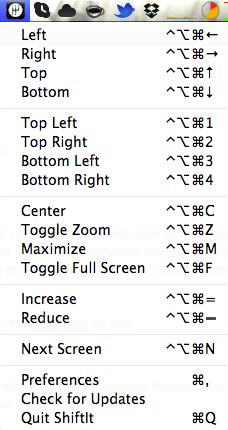
Last ShiftIt release was in 2012. And it requires XQuartz for some reason.
On the other hand, Spectacle (also open source) is supported and it doesn't require XQuartz. That said, I don't like Spectacle default shortcuts (hard to remember for me and there's a conflict with Chrome switch-tab command). I now use http://spectacleapp.com, but with ShiftIt-inspired configuration:
I find that "follow mouse" mode helps alleviate this pain a lot: when you can interact with a window (mouse or keyboard) without having to bring that window in the foreground, you end up moving windows around a lot less.
I like tiling in general but doing it well requires a big monitor.
I don't know, I run dwm on my 11" wide(ish) screen laptop, and it works for me, certainly better than a more traditional WM: generally, the less screen estate you have, the more it pays to make efficient use of it.
If I'm coding in Clojure, I have a vim window on the left, and a repl and a plain terminal (mostly for leiningen and git commands) stacked on the right. I could set this up in a traditional WM: but [a] it would take (a bit) more initial effort and [b] more importantly, with dwm I can temporarily bring in extra windows (e.g. a web browser) and then get rid of them again without having to restore my layout from scratch.
I agree with you about focus follow mouse (though it can be more trouble than it's worth if you have an overly sensitive trackpad).
Agreed in concept, but you can get similar if not greater productivity gains from stacking/floating WMs that let you move and resize windows into a tiling-like configuration. Examples are goomwwm and subtle.
This "manual tiling" approach is also probably the only viable option for tiling-like window management on OS X. While not nearly as powerful or productivity-promoting as the above-mentioned WMs or conventional tiling ones, the OS X program Spectacle (http://spectacleapp.com) makes life a lot easier on OS X for those of us who are used to the screen real estate and keyboard control afforded by tiling WMs.
Edit: Another commenter mentioned the non-free Optimal Layout (http://most-advantageous.com/optimal-layout) for OS X. I haven't downloaded the trial yet, but the website makes it look very promising.
I've used an xmonad clone for osx [0] for about a year now. It's a lot buggier than xmonad - mostly due to osx's terrible apis - but it gets the job done.
Recent versions of Amethyst https://github.com/ianyh/Amethyst have made a pretty much xmonad-like experience on osx. There are a few quirks but I don't see me going back at this point.
I've never worked in a situation where I could use a tiling window manager (OS X here), but I've always wondered how that's supposed to work when my normal workflow involves opening and closing a lot of windows. Especially terminal windows. I open throwaway terminal windows all the time, and then close them if I'm done with them, or keep them open behind my other windows if they have some information in them I need to reference later.
Often when I'm done working, I end up closing perhaps a dozen scratch terminal windows.
Tiling window manager users typically avoid transient windows in much the same way that modern browser users avoid transient browser windows.
For instance, my primary development workspace has four columns: three emacs and one terminal with tab support. I don't open/close new emacs windows or new terminal windows, in the same way that I don't open/close new browser windows: I just use tabs within a single window. Likewise, I use multiple open buffers within my emacs windows, and multiple tabs within my terminal windows. If I need a transient terminal, I switch to a different tab or add a new tab.
Opening/closing transient terminals is pure UX overhead, IMO.
Terminal multiplexers like screen and tmux are a nice alternative to tabbed terminals. They cut down on screen clutter (no need for tabs, scrollbars, etc.) and have the added bonus that they remain running in the background, even accessible over SSH.
(I accidentally killed my X session this morning; everything in tmux survived :) )
I use transient browser windows all the time. I try and group related things into tabs, but a page I just want open for a second usually gets a new window. It's easier than navigating the flat tab list.
Optimal Layout[1] works pretty well as a tiling window manager (or close enough) for OS X. I've been using it as an essential part of my workflow for 2+ years. I also make heavy use of emacsclient and tmux[2] sessions and windows in conjunction with iTerm2[3].
When I have some time to experiment, I'd like to look at replacing Optimal Layout with mjolnir[4] or one of the similar tools listed in mjolnir's README, under Mjolnir vs. other apps.[5] Amethyst[6] looks like another option worthy of consideration.
Optimal Layout looks interesting. I'll have to give it a shot.
Another one you might want to look at is Witch[1]. I've tried it before but it never really "stuck" for me. Maybe I should give it another shot. Witch isn't a window manager though, it's only concerned with making it easy to switch between windows rather than laying them out.
Why do you use iTerm2? I've looked at it in the past, but it just feels non-native enough to bug me. I know they advertise tmux integration, but the one time I tried to find out what that actually entailed, it didn't seem to work for me (though I've been told it basically just uses iTerm2 native splits in place of tmux splits).
I checked out Optimal Layout. It seems possibly useful at first glance, but I already had to disable it, because there's no way to turn off the keyboard shortcuts while in specific apps, and I need to have the keyboard shortcuts disabled while in World of Warcraft.
I started using iTerm2 some years ago. I tried the built-in Terminal.app again earlier this year, just to see if it would work for me, and couldn't figure out how to easily "fix" the keyboard input so that terminal-mode Emacs works as expected, with respect to key sequences involving meta. iTerm2's preferences panel makes the same "fix" quite simple, so I'll be sticking with it for the time being.
Terminal.app doesn't quite have the right default set of bindings, but iTerm2 also has some wrong bindings around the meta key.
If you want to enable option-as-meta in Terminal.app, you select the Profile you want in preferences, go to the Keyboard tab, and there's a checkbox at the bottom. This is also where you can customize the bindings for various key sequences, if you think they're wrong.
There are plenty of apps that provide varying levels of window-manager functionality to OS X. I would try a couple out and see if any seem useful to you.
Using two monitors on Linux and running XMonad changed the game for me. Very organized, productive and efficient interactions with the system grew organically out of it. Even though I tend to use KDE (and KWin) these days on a laptop, that experience helped me drill down into a workflow that I apply anywhere I can. The best thing is that, everybody comes to their own "most efficient" workflow using these tools.
Interacting with OSX/Quartz after that felt something akin to giving up <insert code editor or IDE of choice here> and writing all your code in [TextEdit.app | Notepad.exe | nano].
Also, scratch terminal windows are solved by TMUX and a single terminal.
wtftw is very interesting. I can't wait to give it a shot.
Terminal.app supports tabs, I'm not sure why tmux would be any better (well, tmux can do splits, but transient windows don't need splits).
The problem is if I create a tab, I want it to be at least somewhat related to the other tabs in the window. And even then, I usually use new windows for scratch terminals because I want to see multiple different terminals side-by-side. I could use a vertical tmux split except that shrinks the original terminal, and I want both the original and new terminal to be at their natural size.
TMUX is a transferable implementation of terminal session and "tab" organization. It's also scriptable if you aren't happy with some aspect of it's default presentation or interaction.
For me, that is enormously valuable.
Sounds like your use case could be mapped by TMUX windows acting like Terminal tabs, and TMUX sessions acting like multiple Terminal windows. Except the benefit is that now you can use this workflow on any system with a posix compliant shell and a tmux binary (which I'm pretty certain is practically all the things at this point). Sessions and windows can be given labels which is a nice touch too.
If you are an Emacs user, it's also worth noting that TMUX totally works well with ansi-term. :) I normally have a TMUX session dedicated to an ansi-term buffer in Emacs. Even if I have iTerm or Konsole using another session.
"..but transient windows don't need splits"; well, in my universe transient windows are splits. :)
Anyway, I don't want you to think I'm trying to persuade you into adopting what I consider awesome and useful. Just clarifying my statement. It sounds like you already have a workflow, are happy with it, and don't see any need for alteration.
I use tmux over mosh on my Linode. I've just never found it to be particularly useful on my local machine. Especially because it removes the ability for my terminal to manage history and requires using a keyboard shortcut in order to scroll backwards in history.
I believe Terminal.app handles mouse events differently, so the standard tmux config doesn't work right. Maybe see if https://bitheap.org/mouseterm/ improves matters for you.
Terminal.app doesn't handle mouse events at all. I filed a radar for that a while ago. But I don't consider that good enough reason to use iTerm2 as the programs that actually support CLI mouse events are very rare.
I just use Slate to snap window to left or right. It's not quite like tilting wm but it works quite well. I have no problem with it.
And I do use Emacs, so there wouldn't any problem of splitting with those either. The only thing I miss from tilting wm is its minimal an simplicity. I used to use arch linux with dwm, configuring, patching creating shortcut just take a few line of code here and there, love it :)
My issue with tiling WMs is that there just isn't enough room. I use vim splits in a full-screen terminal but can only fit 2 columns comfortably. I can pull off 3 but then I can't see the full 80 characters in each.