If you're missing the UI for styling, you might try Fireworks.
The idea that Photoshop should be used as a layout tool is an unfortunate accident of history -- it was/is the household name for image manipulation as most designers and developers hit the web. But while it's good for raster/photo editing, sets of pixel layers doth not a good layout/design tool make.
Illustrator's a lot better for this. And Fireworks is made for web layout and screen graphics, has a great mix of vector and raster tools, and is evolving some really sophisticated export abilities including some of the CSS export facilities CSS Hat is doing.
Unfortunately, Illustrator is essentially abandonware at this point. It's so hobbled by design defects and other bugs that you're much better off with Corel Draw, even if you have to run it in a VM on a Mac.
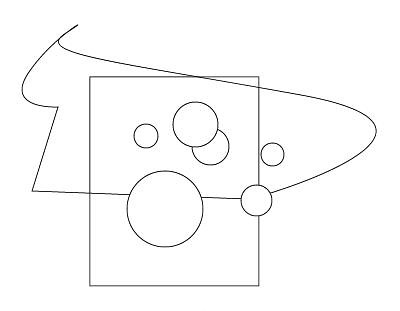
Many (most?) vector-drawing applications let you select only the items that are fully enclosed by a selection rectangle. So if you wanted to select only the circles in that image, you'd need only to draw a selection rectangle around them.
Illustrator gives you no way to do this. Every shape that comes into contact with the selection rectangle (or even the path of the lasso tool) is selected. You can fire up Windows and do the whole thing in Corel Draw in the time you'll waste tediously clicking on everything in Illustrator.
In your example, why not select the non-circles with one rectangle select, then invert the selection by Shift-rectangle selecting everything?
As an aside, the lasso is a "direct selection" tool, operating on individual paths rather than shapes, not that this helps in your example. But it'd work well if I wanted to select, say, only the bottom side of your rectangle, for essentially the reason you dislike.
That works only in a simple example like this, where you can make contact with all of the undesired objects without making contact with the desired ones. This is almost never the case in a real-world illustration.