Considering that there’s no difference between the 1050ti in the OP and the 5500M that PragmaticPulp posted I’m inclined to say this test sucks. Userbenchmark.com shows there should be a substantial (38%) improvement between those two. Take these early results with a HUGE grain of salt because they smell fishy.
1: Userbenchmark.com is terrible and nobody should use it for anything. At least their CPU side of things is hopelessly bought & paid for by Intel (and even within the Intel lineup they give terrible & wrong advice), maybe the GPU side is better but I wouldn't count on it.
2: The real question there isn't "why is the 1050 Ti not faster?" it's "how did you run a 1050 Ti on MacOS in the first place, since Nvidia doesn't make MacOS drivers anymore and hasn't for a long time?"
> Userbenchmark.com is terrible and nobody should use it for anything. At least their CPU side of things is hopelessly bought & paid for by Intel (and even within the Intel lineup they give terrible & wrong advice), maybe the GPU side is better but I wouldn't count on it.
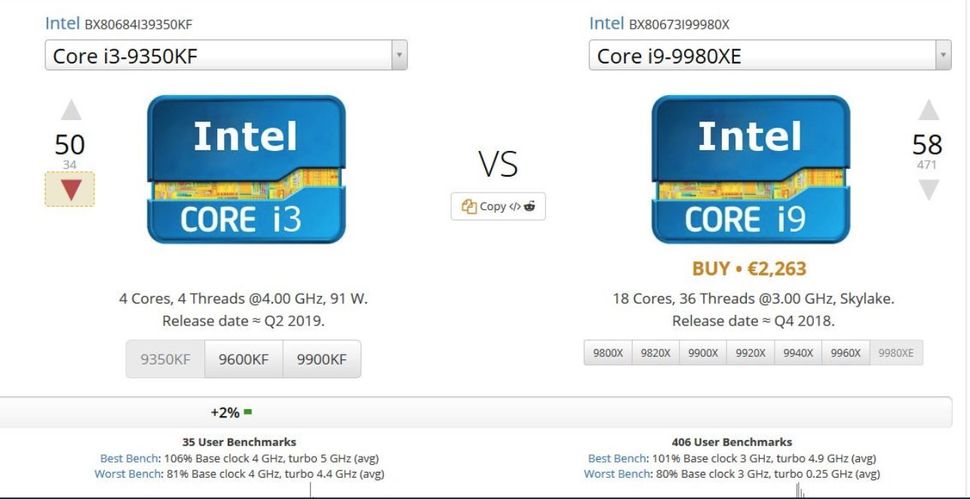
To provide some elaboration on this: Their overall CPU score used to be 30% single, 60% quad, 10% multicore. Last year around the launch of zen 2 they gave it an update. Which makes sense; the increasing ability of programs to actually scale beyond four cores means that multicore should get more importance. And so they changed the influence of multicore numbers from 10% to... 2%. Not only was it a blatant and ridiculous move to hurt the scores of AMD chips, you got results like this, an i3 beating an i9 https://cdn.mos.cms.futurecdn.net/jDJP8prZywSyLPesLtrak4-970...
And there was some suspicious dropping of zen 3 scores a week ago, too, it looks like.
I don’t see that as evidence of blatant bias for Intel. The site is just aimed at helping the average consumer pick out a part, and I think the weighting makes sense.
Most applications can only make use of a few CPU-heavy threads at a time, and these systems with with 18 cores will not make any difference for the average user. In fact, the 18 core behemoth might actually feel slower for regular desktop usage since it’s clocked lower.
If you are a pro with a CPU-heavy workflow that scales well with more threads, then you probably don’t need some consumer benchmark website to tell you that you need a CPU with more cores.
But lots of things do use more than 4 cores, with games especially growing in core use over time. Even more so if you want to stream to your friends or have browsers and such open in the background. To suddenly set that to almost zero weight, when it was already a pretty low fraction, right when zen 2 came out, is clear bias.
> In fact, the 18 core behemoth might actually feel slower for regular desktop usage since it’s clocked lower.
The amount of processes running on a windows OS reached 'ludicrous speed' many years ago. Most of these are invisible to the user, doing things like telemetry, hardware interaction, and low level and mid level OS services.
A quick inspection of the details tab in my task manager shows around 200 processes, only half of which are browser.
And starting a web browser with one page results in around half a dozen processes
Regarding 2. I think that none of those benchmarks were run on MacOS. Their benchmark tool seems to be Windows-only https://www.userbenchmark.com/ (click on "free download" and the MacOS save dialogue will inform you that the file you are about to download is a Windows executable).
1. Today I learned something new. Still, can’t let great be the enemy of good. It may be imperfect but it’s the source I used. Do you have a better source I can replace it with?
2. That’s a good question and I don’t have an answer for that.
Sure, great is the enemy good etc
, but the allegation here and in other threads is that these benchmarks are bad. Or, worse, inherently and deliberately biased.
As for a better source, I don't know with the M1 being so new, but that's no reason to accept bad data, if this benchmark actually is as bad as others here are saying.
It's not the 4-6x in raw graphics improvement advertised but at 10W vs Xe Max's 25W for just the GPU, the M1 getting 50% more fps, that's still 3.75x in perf/watt.
Let alone - let's really not forget that this is an HBM type architecture. As a complete package it seems awesome, but we can argue for ages about the performance of GPU cores with no end result.
You'd think so, but seems most people[1] think it's just LPDDR wired to the SoC using the standard protocol, inside the same package. (Though it might use > 1 channel I guess?)
Which would be the same width as dual channel DDR4 – 8x16 == 2x64 :)
Also it's completely ridiculous that some people think it might be HBM. The presentation slide (shown in both anandtech articles) very obviously shows DDR style chips, with their own plastic packaging. That is not how HBM looks :) Also HBM would noticeably raise the price.
Unfortunately it’s the GPU that causes the issue, not the CPU.
Whatever bus video runs over is wired through the dedicated GPU, so integrated is not an option with external monitors connected. That by itself would be fine, except for whatever reason, driving monitors with mismatched resolutions maxes the memory clock on the 5300M and 5500M. This causes a persistent 20W power draw from the GPU, which results in a lot of heat and near-constant fan noise, even while idle. As there isn’t a monitor in the world that matches the resolution of the built-in screen, this means the clocks are always maxed (unless you close the laptop and run in clamshell mode).
The 5600M uses HBM2 memory and doesn’t suffer from the issue, but a £600 upgrade to work around the issue is lame, especially when I don’t actually need the GPU, you just can’t buy a 16” without one.
Disabling turbo boost does help a little, but it doesn’t come close to solving it.
My memory is hazy on this but I did come across an explanation for this behaviour. At mismatched resolutions or fractional scaling (and mismatched resolutions are effectively fractional scaling) macOS renders the entire display to a virtual canvas first. This effectively requires the dGPU.
Your best bet is to run external displays at the MBPs resolutions and because that is not possible/ideal you are left with choices of running at 1080p/4k/5k. macOS no longer renders crisp on 1080p so 3840x2160 is the last remaining widely available and affordable choice while 5K is still very expensive.
Hardly anyone makes 5K displays - I have a pair of HP Z27q monitors made in late 2015 that are fantastic, but I had to get them used off eBay because HP and Dell both discontinued their 5K line (Dell did replace it with an 8K, but that was way out of my budget).
Part of the reason for 5K’s low popularity was its limited compatibility: they required 2xDP1.2 connections in MST mode. Apple’s single-cable 5K and 6K monitors both depend on Thunderbolt’s support for 2x DP streams to work. I’m not aware of them being PC-compatible monitors at native resolution yet.
I love 5K - but given a bandwidth boost I’d prefer 5K @ 120Hz instead of 8K @ 60Hz.
I am a bit curious to know why this specific problem has been appearing in various Nvidia lineups in the beginning of the decade, and is reappearing now.
Offscreen benchmarks just mean that they are run at a fixed resolution and not limited by vsync. These benchmarks are better for comparing one GPU to another. Onscreen can be artificially limited to 60fps and/or run at the native resolution of the device which can hugely skew the results (A laptop might show double the benchmark speed just because it has a garbage 1366x768 display).


Compared to the AMD Radeon Pro 5600M, the +$700 upgrade in the top of the line MacBook Pro 16": https://gfxbench.com/compare.jsp?benchmark=gfx50&did1=907542...
Note that the Onscreen numbers are capped at 60fps on OS X, so ignore any Onscreen results at 59-60fps.